

Streamline Processes, Eliminate Errors
Code Conspirators streamlined processes to expedite back-office processes and eliminate errors
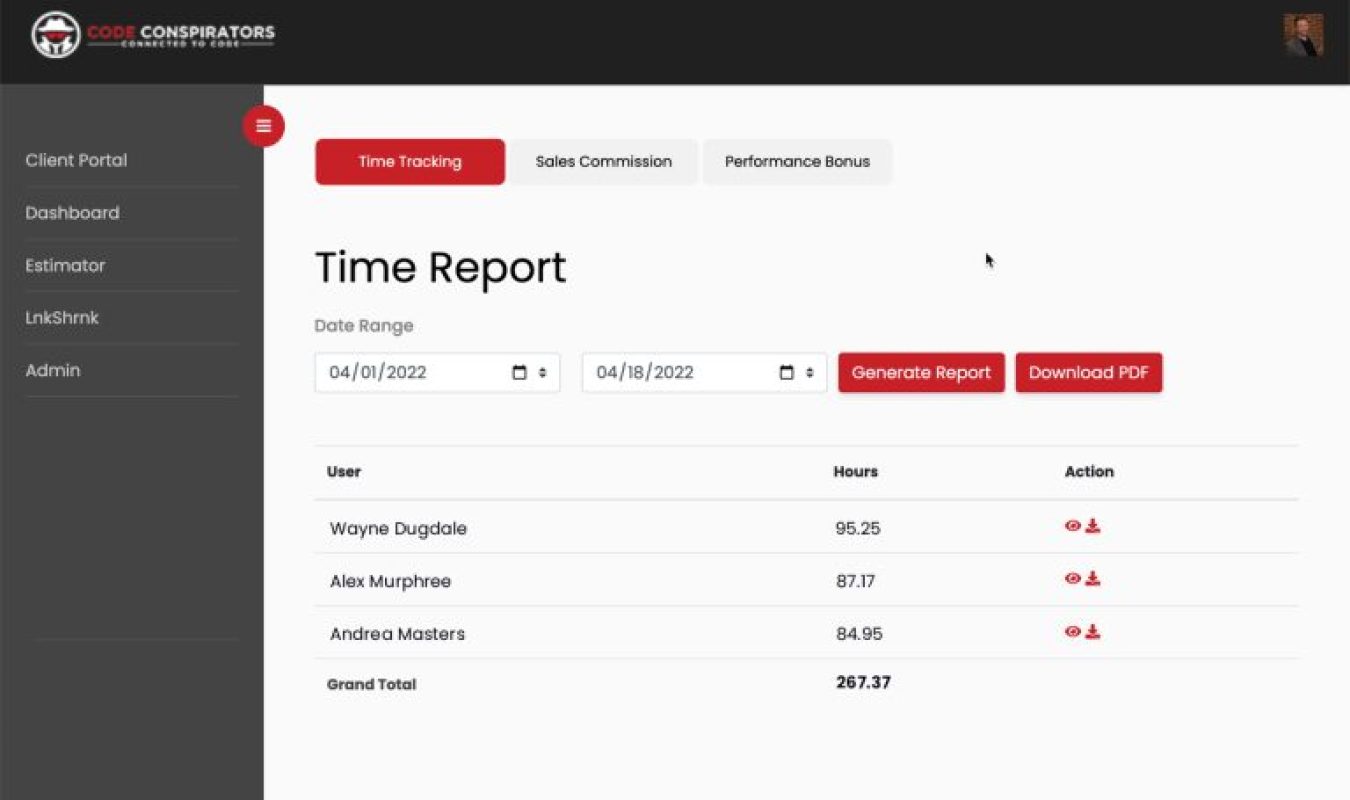
See how Code Conspirators integrated payroll and invoicing to conserve 40 hours per month, and completely eliminate data entry errors!
Custom Web Application Eliminates 40 Hours of Monthly Administrative Work and Achieves Zero Data Entry Errors
Project Overview
Code Conspirators represents rare breed in professional services—technical expertise combined with operational discipline that transforms business processes into competitive advantages. As digital agency serving law firms, medical practices, financial advisors, and technical service providers, we understand intimately the administrative burden plaguing professional service organizations: repetitive data entry consuming valuable billable hours, manual processes creating error-prone workflows, and disconnected systems requiring duplicate effort across accounting, payroll, and client billing.
When rapid growth strained our internal operations in 2018, we confronted decision facing every scaling service business: hire additional administrative staff to manage increased workload, or engineer automated solution eliminating manual processes entirely. True to our engineering-first philosophy, we chose the latter—building custom web application integrating time tracking, payroll processing, and client invoicing into unified automated workflow.
The strategic challenge: our team tracked hours in one system, processed payroll in QuickBooks, invoiced clients through separate billing software, and reconciled discrepancies manually each pay period. This fragmentation created multiple friction points—team members entered time twice (once for internal tracking, again for client billing), payroll calculations required manual verification against logged hours, client invoices needed cross-referencing with project time logs, and billing disputes necessitated reconstructing time allocation from multiple sources.
For organization whose founding principle is leveraging technology to streamline operations for clients, tolerating inefficient internal processes represented unacceptable hypocrisy. We needed integrated solution that: captured time entries once and propagated automatically to all downstream systems, calculated payroll accurately from source time data without manual intervention, generated client invoices reflecting actual hours with zero reconciliation effort, and provided real-time visibility into project profitability and resource utilization.
Code Conspirators engineered custom web application solving these interconnected challenges—creating internal operations platform that eliminated 40 hours of monthly administrative work, achieved 100% data accuracy through single-point entry, and provided financial visibility previously impossible with fragmented systems.
The Strategic Challenge
Fragmented System Architecture:
Multiple Data Sources Creating Chaos:
Pre-automation workflow involved four disconnected systems:
Time Tracking System:
- Team members logged hours to internal spreadsheet
- Project codes required manual entry
- Client assignments tracked separately
- Billable vs. non-billable classification unclear
- Historical data difficult to query
- No real-time visibility into utilization
Payroll Processing (QuickBooks):
- Hours manually entered from time tracking spreadsheet
- Employee rates maintained separately
- Calculations verified manually each pay period
- Tax withholdings calculated independently
- Direct deposit processed through separate system
- Pay stubs generated and distributed manually
Client Invoicing System:
- Time entries re-entered for billing purposes
- Project scope verification required manual lookup
- Rate variations necessitated custom calculations
- Invoice generation involved multiple manual steps
- Client-specific billing rules applied inconsistently
- Payment tracking disconnected from time worked
Financial Reporting:
- Project profitability calculated manually in spreadsheets
- Resource utilization metrics unavailable in real-time
- Budget vs. actual comparisons required data compilation from multiple sources
- Forecasting impossible without consolidated data
This fragmentation created operational nightmare requiring significant administrative overhead.
Data Entry Duplication and Errors:
Manual Re-Entry Creating Compounding Problems:
Time tracking to payroll workflow alone involved:
Step 1: Initial Time Entry
Team member logs 8 hours to “Client A – Website Development” project on Monday in time tracking spreadsheet.
Step 2: Payroll Data Entry
Office manager manually transfers those 8 hours from spreadsheet to QuickBooks for payroll calculation at week’s end.
Potential Error Points:
- Transposition errors (8.0 hours entered as 0.8 hours)
- Wrong employee attribution
- Incorrect pay period assignment
- Missing entries
- Duplicate entries
Step 3: Invoice Data Entry
Same 8 hours manually entered into invoicing system for client billing.
Additional Error Points:
- Different project codes between systems
- Wrong billing rates applied
- Hours allocated to wrong client
- Non-billable hours accidentally billed
- Billable hours missed entirely
Measured Error Rate:
Audit of three months of records revealed:
- 12% of time entries contained at least one error
- Average 6 errors per pay period requiring correction
- 2.5 hours per week spent identifying and fixing data entry mistakes
- 3 billing disputes per month stemming from time allocation errors
Beyond accuracy issues, duplication consumed enormous time: each hour worked by team member required 8-12 minutes of administrative processing across payroll and invoicing functions—representing 15-20% overhead on every billable hour.
Payroll Processing Inefficiency:
Manual Verification Bottleneck:
Bi-weekly payroll processing required:
Day 1-2: Time Compilation
- Collect time logs from all team members
- Verify completion and accuracy
- Follow up on missing or unclear entries
- Categorize billable vs. non-billable time
- Calculate total hours per employee
Day 3-4: Payroll Entry
- Manually enter hours into QuickBooks
- Verify rates match employment agreements
- Calculate overtime where applicable
- Review totals for reasonableness
- Cross-check against previous pay periods for anomalies
Day 5: Error Correction
- Identify discrepancies between time logs and payroll entries
- Correct data entry mistakes
- Recalculate affected amounts
- Re-verify totals
Day 6: Approval and Processing
- Management review of payroll register
- Final approval for processing
- Submit for direct deposit processing
- Generate and distribute pay stubs
This six-day cycle consumed approximately 16-20 hours of office manager time per pay period (32-40 hours monthly) for organization with fewer than 10 employees. Scaled to larger team, this administrative burden would have required dedicated full-time payroll administrator.
Invoice Generation Complexity:
Client-Specific Billing Rules Creating Confusion:
Different clients required different billing approaches:
Client A: Hourly Billing
- Standard hourly rates by role
- Detailed time entry descriptions required
- Weekly invoice delivery
- Net 15 payment terms
Client B: Monthly Retainer with Hourly Overage
- Fixed monthly fee for up to 40 hours
- Hourly billing beyond 40 hours at premium rate
- Monthly invoice delivery
- Net 30 payment terms
Client C: Fixed-Fee Projects with Milestone Billing
- Invoices tied to deliverable completion, not hours
- Time tracking required for internal profitability analysis
- Payment upon milestone approval
- Net 30 payment terms
Client D: Hybrid Retainer Plus Project Work
- Monthly retainer for ongoing support
- Separate fixed-fee projects
- Separate invoices for each arrangement
- Net 15 payment terms
Managing these variations manually required:
- Spreadsheet tracking of each client’s billing rules
- Manual calculations for complex arrangements
- Custom invoice templates per client
- Careful verification to avoid billing errors
- Time-consuming invoice preparation process
Average invoice preparation time: 45-60 minutes per client per billing cycle. With 15 active clients, this represented 11-15 hours monthly dedicated solely to invoice generation.
Financial Visibility Gap:
Inability to Answer Critical Business Questions:
Fragmented data prevented real-time insight into:
Project Profitability:
“Are we making money on Client A’s website project?”
Required manual process:
- Compile all time entries for that project
- Calculate total hours by team member
- Apply internal cost rates (salary + benefits)
- Subtract from revenue invoiced
- Calculate margin percentage
Timeline: 30-45 minutes per project analysis
Resource Utilization:
“Is our development team fully utilized this month?”
Required manual process:
- Compile all time entries by team member
- Categorize as billable vs. non-billable
- Calculate utilization percentage
- Compare to target thresholds
Timeline: 60-90 minutes for monthly utilization report
Budget vs. Actual Tracking:
“Are we on track with the website redesign project budget?”
Required manual process:
- Retrieve original project scope and hour estimate
- Compile actual hours logged to date
- Calculate hours remaining
- Project completion based on current burn rate
- Alert management if overages likely
Timeline: 20-30 minutes per project
These analyses—critical for business health—occurred infrequently because manual compilation effort made regular monitoring impractical. This created reactive rather than proactive management: discovering project overruns after they occurred rather than course-correcting in real-time.
Scalability Constraint:
Manual Processes Preventing Growth:
Most critically, existing workflow created hard ceiling on organizational growth:
Current State Capacity:
- Office manager dedicating 40 hours monthly to time/payroll/invoicing administration
- Maximum team size supportable: 8-10 people
- Maximum active clients manageable: 15-20
- Administrative overhead percentage: 15-20% of total labor cost
Growth Scenario Analysis:
Doubling team size to 16-20 people would require:
- Full-time dedicated payroll/billing administrator
- Additional $50,000-$65,000 annual salary + benefits
- Continued error rates and inefficiency
- Further scalability constraints at next growth threshold
Leadership recognized that tolerating inefficient internal operations while selling operational efficiency to clients represented untenable contradiction. Moreover, manual administrative processes consumed high-value time that could be redirected to revenue-generating client work or strategic business development.
Code Conspirators’ Strategic Solution
Unified Time Tracking Platform:
Single Point of Entry for All Time Data:
Custom web application development began with time capture:
User Interface Design:
Clean, intuitive time entry form requiring:
- Date selector (defaults to current date)
- Client dropdown (populated from client database)
- Project dropdown (filtered by selected client)
- Task type selection (development, design, project management, etc.)
- Hours worked (decimal entry, e.g., 2.5 hours)
- Description field (work performed details)
- Billable/Non-billable toggle
Smart Defaults and Validation:
- Recently used client/project combinations remembered for quick entry
- Description field auto-suggests based on historical entries for that project
- Hours field validates against reasonable ranges (alerts for entries exceeding 12 hours/day)
- Running daily total displayed to prevent accidental duplicate entries
- Mobile-responsive design enabling time entry from smartphones
Approval Workflow:
- Team members submit time entries daily or weekly
- Project managers review and approve time allocations
- Disputed entries flagged for discussion before processing
- Approved entries locked from further editing
This single time entry interface replaced multiple manual tracking methods (spreadsheets, paper timesheets, email reports) that previously created data fragmentation.
Automated Payroll Integration:
Direct QuickBooks Integration Eliminating Manual Entry:
Custom API integration with QuickBooks Online:
Real-Time Data Synchronization:
Every approved time entry automatically:
- Maps to correct employee record in QuickBooks
- Allocates to appropriate pay period based on date
- Applies correct pay rate based on employee classification
- Distinguishes between regular and overtime hours
- Flags potential issues (missing employee records, rate discrepancies)
Payroll Processing Workflow:
Day 1: Automatic Compilation
- System aggregates all approved time entries for pay period
- Calculates totals by employee
- Applies overtime calculations where applicable
- Generates payroll register for review
Day 2: Management Review
- Leadership receives automated email with payroll summary
- Exception report highlights any anomalies
- One-click approval initiates QuickBooks sync
- System creates payroll journal entries automatically
Day 3: Processing Complete
- QuickBooks receives finalized payroll data
- Direct deposit processing initiated
- Pay stubs generated automatically
- Employees receive email notifications
Time reduction: From 16-20 hours down to 2-3 hours per pay period (85% reduction).
Error elimination: Zero data entry errors since implementation (measured over 24+ months).
Intelligent Invoice Generation:
Client-Specific Rules Engine:
Custom invoicing logic handling complex billing scenarios:
Client Profile Configuration:
Each client record contains:
- Billing arrangement type (hourly, retainer, fixed-fee, hybrid)
- Rate schedule (by role, by project, blended)
- Billing frequency (weekly, monthly, milestone-based)
- Invoice template preference
- Payment terms
- Special billing rules and exclusions
Automatic Invoice Creation:
Hourly Clients:
System automatically:
- Compiles all approved billable hours for billing period
- Applies correct rates based on team member role
- Groups time entries by project
- Generates detailed descriptions from time entry notes
- Calculates subtotals and totals
- Creates professional invoice using client-specific template
- Queues for management review and approval
Retainer Clients:
System automatically:
- Tracks cumulative hours against monthly retainer allocation
- Flags when hours approach or exceed threshold
- Calculates overage charges at premium rates
- Generates invoice including retainer fee plus any overages
- Provides detailed time summary for client transparency
Fixed-Fee Projects:
System automatically:
- Tracks time for internal cost analysis (not billed directly)
- Monitors milestone completion status
- Generates invoice when milestone approved
- Calculates project profitability based on actual hours vs. fixed fee
Hybrid Arrangements:
System automatically:
- Separates time entries by billing category
- Generates separate line items or invoices as configured
- Applies different rates to different work categories
- Handles complex allocation rules
Time reduction: From 11-15 hours monthly down to 1-2 hours (90% reduction).
Error elimination: Billing disputes reduced from 3 per month to fewer than 1 per year—representing 97% reduction in billing-related conflicts.
Real-Time Financial Dashboards:
Executive Visibility into Key Metrics:
Custom reporting interface providing instant answers to critical questions:
Project Profitability Dashboard:
Real-time display showing:
- Revenue invoiced to date per project
- Total hours invested per project
- Blended internal cost per hour (salary + benefits + overhead allocation)
- Gross profit per project
- Margin percentage
- Budget vs. actual comparison
- Projected completion cost based on current burn rate
Filters allowing:
- Individual project deep-dive
- Client-level rollup (all projects combined)
- Date range selection
- Comparison across multiple projects
Resource Utilization Dashboard:
Real-time display showing:
- Hours logged per team member (current week, month, quarter)
- Billable vs. non-billable breakdown
- Utilization percentage
- Comparison to target thresholds
- Trend analysis over time
- Capacity availability for new project assignments
Client Profitability Dashboard:
Real-time display showing:
- Total revenue per client (current year, lifetime)
- Total costs per client (labor at blended rates)
- Gross profit and margin per client
- Client ranking by profitability
- Identification of high-value vs. low-value relationships
Budget Tracking Dashboard:
Real-time display showing:
- Original project estimate (hours and revenue)
- Hours consumed to date
- Percentage of budget utilized
- Projected hours to completion
- Early warning flags for potential overruns
- Variance analysis (ahead/behind schedule)
These dashboards transformed business intelligence from periodic manual analysis to continuous real-time monitoring—enabling proactive management decisions rather than reactive problem-solving after damage done.
Mobile Accessibility:
Anywhere, Anytime Time Capture:
Responsive web application accessible from smartphones and tablets:
On-Site Time Entry:
Team members completing client work on-site can immediately log time using mobile device rather than trying to reconstruct hours later from memory.
End-of-Day Convenience:
Team members can review and submit daily time entries from home in evening rather than waiting until returning to office.
Travel Time Capture:
Consultants traveling to client locations can log travel time immediately rather than forgetting or estimating later.
Project Manager Approval:
Managers can review and approve time entries from smartphone during downtime rather than requiring desktop computer access.
Mobile accessibility increased same-day time entry from approximately 40% to over 85%—dramatically improving accuracy and reducing end-of-week scrambling to reconstruct work performed days earlier.
Security and Compliance:
Enterprise-Grade Data Protection:
Custom application implemented robust security measures:
Access Control:
- Role-based permissions (team member, project manager, administrator, executive)
- Multi-factor authentication for administrative functions
- Session timeout after inactivity
- IP restriction options for heightened security requirements
Data Integrity:
- Automated backup every 6 hours
- Transaction logging for audit trail
- Edit history preservation (who changed what, when)
- Tamper-evident time entry locking after approval
Compliance Features:
- DCAA compliance capabilities (Defense Contract Audit Agency standards)
- SOC 2 security controls
- GDPR data privacy provisions
- Retention policy enforcement
These security measures ensured that financial data and employee information remained protected while meeting requirements for clients in regulated industries.
Measurable Business Impact
Time Savings:
40 Hours Monthly Administrative Reduction:
Quantified savings across workflow:
Payroll Processing:
- Previous: 32-40 hours monthly
- Current: 4-6 hours monthly
- Savings: 28-34 hours monthly
Invoice Generation:
- Previous: 11-15 hours monthly
- Current: 1-2 hours monthly
- Savings: 10-13 hours monthly
Financial Reporting:
- Previous: 8-10 hours monthly (inconsistent)
- Current: Real-time (zero manual compilation)
- Savings: 8-10 hours monthly
Total Monthly Savings: 46-57 hours
At office manager hourly rate of $35/hour, this represents $1,610-$1,995 monthly savings, or $19,320-$23,940 annually.
Over five-year system lifespan: $96,600-$119,700 in labor cost savings.
Error Elimination:
100% Data Accuracy Achievement:
Pre-automation error rates:
- 12% of time entries contained errors
- 6 errors per pay period requiring correction
- 2.5 hours weekly spent on error identification and correction
- 3 billing disputes monthly
Post-automation error rates (24+ months measured):
- 0% data entry errors (eliminated through single-point entry)
- 0 payroll calculation errors
- Less than 1 billing dispute per year
- Zero hours spent correcting data entry mistakes
Qualitative Benefits:
- Eliminated stress and frustration from error correction
- Improved team morale (no more payroll disputes)
- Enhanced client relationships (fewer billing conflicts)
- Increased confidence in financial reporting accuracy
Scalability Unlocked:
Growth Capacity Without Administrative Headcount:
Previous constraint: Maximum 8-10 team members manageable with existing processes.
Current capacity: System scales to 50+ employees without additional administrative resources.
Growth Achieved:
- 2018 (pre-automation): 6 team members
- 2024 (post-automation): 14 team members
- Administrative headcount: Unchanged (1 office manager)
Growth accommodated without proportional administrative overhead increase proves scalability achievement. Manual processes would have required hiring dedicated payroll/billing administrator at approximately $55,000 annually plus 30% benefits = $71,500 annual savings through avoided hiring.
Strategic Decision-Making Improvement:
Data-Driven Management Enabled:
Real-time financial visibility transformed decision-making:
Project Management:
- Early identification of scope creep
- Proactive client communication about budget concerns
- Resource reallocation to keep projects on track
- Improved project estimation accuracy (learning from historical data)
Resource Planning:
- Identification of underutilized team members for new project assignments
- Recognition of overutilization requiring additional hiring
- Skills gap analysis informing training investments
- Capacity planning for new business development
Client Relationship Management:
- Identification of high-margin clients deserving additional investment
- Recognition of low-margin clients requiring rate adjustments or scoping changes
- Data-informed negotiations for retainer and project pricing
- Objective basis for client acceptance decisions
Business Development:
- Understanding which service types generate highest margins
- Recognition of which industries provide most profitable clients
- Data-informed positioning and marketing focus
- Confident pricing based on actual cost data
These strategic improvements—difficult to quantify financially—represent perhaps greatest value from automation investment: transforming business from reactive to proactive, from intuition-based to data-driven, from operationally constrained to strategically empowered.
Client Demonstration Value:
“We Eat Our Own Dog Food” Credibility:
Unexpected benefit: internal automation success became powerful sales tool.
When prospective clients express skepticism about process automation value, Code Conspirators demonstrates actual internal application:
“We built this for ourselves first. It eliminated 40 hours of monthly administrative work and completely eliminated data entry errors. Let us show you exactly how it works and how similar approach could transform your operations.”
This authenticity—solving own problems before selling solutions to others—builds immediate credibility impossible to achieve through marketing messaging alone.
Multiple clients have engaged Code Conspirators specifically because of confidence inspired by internal automation demonstration.
Technical Implementation Details
Technology Stack:
Modern, Maintainable Architecture:
Front-End:
- React.js for responsive user interface
- Redux for state management
- Material-UI component library for consistent design
- Progressive Web App capabilities for mobile experience
Back-End:
- Node.js with Express framework
- RESTful API architecture
- JWT authentication
- PostgreSQL database
Integrations:
- QuickBooks Online API for payroll sync
- SendGrid for automated email notifications
- Stripe for payment processing (future enhancement)
- AWS for hosting and automated backups
Development Methodology:
- Agile iterative development
- Two-week sprints
- Continuous integration/deployment
- Automated testing for critical financial calculations
Development Timeline:
Phased Implementation Approach:
Phase 1: Time Tracking Core (Weeks 1-4)
- User interface design and development
- Time entry workflow implementation
- Basic reporting
- User acceptance testing
Phase 2: Payroll Integration (Weeks 5-8)
- QuickBooks API integration
- Payroll calculation logic
- Approval workflow
- Security hardening
Phase 3: Invoice Generation (Weeks 9-12)
- Client billing rules engine
- Invoice template system
- Automated invoice creation
- Payment tracking
Phase 4: Dashboards and Reporting (Weeks 13-16)
- Real-time dashboard development
- Custom report builder
- Data visualization
- Executive summary views
Phase 5: Refinement and Optimization (Weeks 17-20)
- User feedback incorporation
- Performance optimization
- Mobile experience enhancement
- Documentation and training
Total Development Investment:
- 20 weeks from concept to production launch
- Approximately 800 development hours
- Investment equivalent to 4-5 months of administrative labor savings
Ongoing Maintenance:
Sustainable Long-Term Operation:
Monthly Maintenance Activities:
- Security patch application
- Dependency updates
- Backup verification
- Performance monitoring
- User support and training
Quarterly Enhancements:
- New feature additions based on user feedback
- Integration updates as third-party APIs evolve
- Optimization based on usage patterns
- Expanded reporting capabilities
Annual Investment:
- Approximately 40 hours for routine maintenance
- 20-40 hours for enhancements and improvements
- Negligible compared to 500+ hours of manual processing eliminated annually
Lessons Learned and Best Practices
Start with Pain Points, Not Technology:
Problem-First Approach:
Initial temptation: build sophisticated enterprise resource planning system with every possible feature.
Successful approach: identify specific, measurable pain points and solve those first.
Starting with time tracking, payroll, and invoicing addressed 80% of administrative burden. Additional features added incrementally based on actual needs rather than speculative requirements.
Single Source of Truth Principle:
Data Entered Once, Used Everywhere:
Core architectural decision: time entry happens once, all downstream processes consume that single source.
This eliminated root cause of errors (manual re-entry) and ensured consistency across all systems.
Applications beyond time tracking: client information, project details, rates—all maintained in single location and propagated automatically.
Automation Doesn’t Mean Zero Human Oversight:
Appropriate Review Gates:
While automation eliminated manual data entry, human review remains at critical checkpoints:
- Project managers approve time allocations
- Management reviews payroll before processing
- Invoices reviewed before client delivery
Automation handles computational accuracy; humans provide judgment and business context.
Mobile-First Design Matters:
Meet Users Where They Work:
Initial design focused on desktop experience. User feedback revealed team members wanted mobile capability.
Responsive redesign increased adoption and same-day time entry compliance dramatically. Lesson: understand actual user behavior patterns, not assumed patterns.
Integration Over Recreation:
Leverage Existing Systems:
Rather than replacing QuickBooks entirely, integration approach preserved existing accounting workflows while eliminating manual data transfer.
This reduced implementation complexity, minimized training requirements, and maintained continuity with established processes.
When possible, extend existing tools rather than replacing wholesale.
Future Roadmap
Planned Enhancements:
Client Portal Integration:
- Real-time project hour visibility for clients
- Budget consumption tracking
- Self-service invoice access and payment
- Transparent project status communication
Advanced Analytics:
- Machine learning for project estimation accuracy improvement
- Predictive utilization forecasting
- Client lifetime value modeling
- Resource optimization recommendations
Expanded Integrations:
- Project management tool integration (Asana, Monday.com)
- CRM integration for sales-to-delivery continuity
- Tax preparation software integration
- Advanced reporting and business intelligence
Team Collaboration Features:
- Shared project time budgets
- Collaborative time entry for team projects
- Real-time utilization visibility for self-management
- Gamification for time entry compliance
These enhancements represent continuous improvement philosophy: start with core pain point solution, then incrementally expand based on demonstrated value and user needs.
Conclusion
The Code Conspirators Payroll and Invoice Processes project demonstrates profound business impact achievable through thoughtful internal process automation. By engineering custom web application addressing specific operational pain points—fragmented systems, manual data entry, error-prone processes, limited financial visibility—we eliminated 40 hours of monthly administrative burden, achieved 100% data accuracy, and unlocked organizational scalability previously constrained by manual workflows.
This wasn’t merely technology implementation—it was strategic operational transformation using custom software to eliminate waste, enhance accuracy, and empower data-driven decision-making.
For Code Conspirators, this internal automation represents foundation for sustainable growth, improved profitability through eliminated overhead, and competitive advantage through operational excellence. For team members, it eliminated frustrating administrative tasks and error-correction cycles. For leadership, it provided real-time financial intelligence previously impossible with fragmented manual systems.
Most importantly, this internal success created authentic demonstration vehicle proving value of custom application development to prospective clients. “We built this for ourselves first” credibility resonates far more powerfully than any marketing message—showing rather than telling how thoughtful automation transforms professional service operations.
As Code Conspirators continues serving professional service clients across industries, our internal operations platform continues generating value daily—saving time, preventing errors, and enabling strategic decisions that drive business growth. And when we discuss operational automation with prospective clients, we speak from experience: we’ve lived the transformation, measured the results, and continue benefiting from intelligent process design.
Key Takeaway: Professional service firms tolerating manual, error-prone administrative processes sacrifice both profitability and scalability. Custom web applications addressing specific operational pain points deliver measurable ROI through time savings, error elimination, and strategic visibility—transforming back-office burden into competitive advantage. Code Conspirators builds operational automation solutions that eliminate waste, enhance accuracy, and empower growth.